
Free Shop Ops Lab Checklist
Build your stack without guessing — POD, handmade, or scaling.
Best Bookkeeping & COGS Tools for Handmade Sellers (2026): Costing vs Ledger
Costing answers what a piece costs; the ledger answers if the business profits—don’t buy one tool for both jobs.
Quick verdict: Handmade money tools fail when you buy an accounting app expecting maker COGS, or a COGS app expecting a full ledger. Split the jobs: Craftybase-class for recipes/BOM → unit COGS; Wave / QuickBooks Online / Zoho Books for P&L and tax-ready books; Taxomate / Synder-class importers to pull Etsy fees into the ledger.
One-liner: Costing answers “what does this mug cost me?” Ledger answers “did the business profit?” Importers save typing — they don’t invent your recipe costs.
Beat of this page: which job each tool does — not a single “best bookkeeping app” crown that pretends COGS and ledgers are the same product.
Affiliate link — we may earn a commission at no extra cost to you. Verify live offer at publish.
Three jobs (don’t collapse them)
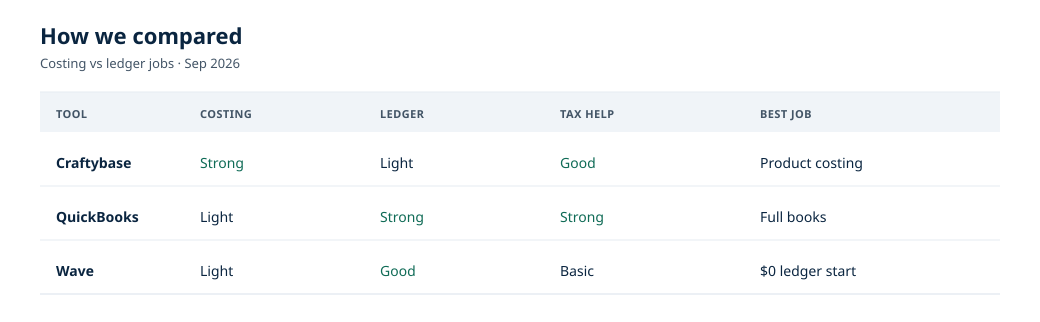
SERP conflates accounting apps with true maker COGS. Buy the tool that matches the job — or you’ll still underprice while staring at a pretty P&L.
Clear picks by seller type
Spreadsheet COGS + Wave-class
Learn the math before paying for two SaaS seats. Free/cheap ledger + a serious COGS sheet is enough early on.
Craftybase-class + ledger
Recipes change; unit cost must follow. Pair costing with Wave / QBO / Zoho for official books.
Affiliate link — we may earn a commission.
Ledger + importer
Skip BOM tools — no physical recipe to track. Fee visibility and P&L beat maker costing here.
QBO / Zoho + connector + costing
Accountant + fee chaos need structure. Keep costing if you still manufacture.
Seller-type stack matrix
Seller Ledger–class note: Fee/P&L views help some Etsy sellers — useful for resellers and digital sellers who need marketplace clarity. They are not a substitute for recipe costing if you manufacture. Confirm current product name, features, and pricing at publish; we are not inventing endorsements or credentials.
Job 1: Maker costing (Craftybase-class)
Best for: materials, labor assumptions, batch yields → COGS per listing/SKU
Craftybase-class costing is for makers who buy materials in bulk, lose track of what each finished unit absorbed, or need a recipe (BOM) that updates when clay, findings, or blanks change price. It’s good at turning materials, labor assumptions, and batch yields into COGS per listing or SKU. The honest limit: costing isn’t a ledger—your accountant still needs income, expenses, and reports elsewhere, and a BOM won’t fix underpricing if you ignore fees and your own time.
Who it’s for: Makers who buy materials in bulk, forget what each finished unit absorbed, or need a recipe (BOM) that updates when clay, findings, or blanks change price.
What it’s good at
- Recipes/BOM → unit COGS that follows material price swings
- Waste, packaging, and “oops, I underpriced” visibility
- Batch yields and labor assumptions tied to finished units
Where it falls short / not for
- Replacing your CPA’s ledger or filing taxes
- Inventing fees Etsy already itemizes elsewhere
- POD-only shops where print + base + shipping + platform fees are the whole COGS story
Cost framing: Soft CTA only — Verify naming, plans, and pricing at publish. We will not invent affiliate commission rates or claim “every six-figure maker uses X.”
If you’re POD-only: margin worksheets in POD weekly ops and best POD may be enough until you also make physical goods.
Affiliate link — we may earn a commission at no extra cost to you. Soft stub — verify live offer.
Job 2: Ledger (Wave / QBO / Zoho)
Best for: income, expenses, reports, tax packages
A ledger (Wave, QuickBooks Online, or Zoho Books) is for anyone whose tax workflow needs books they can actually open—income, expenses, reports, and packages your CPA recognizes. Pick the ledger your tax person can live in, not the prettiest dashboard demo. The honest limit: none of these replace maker costing; if you only track deposits and skip COGS, the P&L will lie about whether the craft is profitable.
Who it’s for: Anyone whose accountant (or future self in April) needs books they can actually open. Costing apps do not make a ledger redundant at scale.
Pick rule: choose the ledger your tax workflow can live in — not the one with the prettiest dashboard demo. If your CPA only works in QBO, fighting them with a random app costs more than the subscription difference.
Pricing: Verify at publish. Editorial — no dedicated /go/ stubs for Wave / QBO / Zoho in this pack.
Editorial — Wave / QuickBooks Online / Zoho Books. No invented commissions or plan dollars.
Job 3: Marketplace importers (Taxomate / Synder-class)
Best for: syncing marketplace payouts, fees, and order-level noise into the ledger
Marketplace importers (Taxomate / Synder-class) are for sellers who are done hand-keying Etsy deposits, fees, and order-level noise into the ledger every month. They’re good at syncing payouts and fee lines so the books match what marketplaces actually remitted. The honest limit: importers don’t invent a BOM or tell you what a piece costs to make—wire them into a real ledger, and verify which channels and fee breakdowns your plan supports at publish.
Who it’s for: Sellers who stop hand-keying Etsy deposits and fee lines every month.
What it’s good at
- Pulling payouts and fee lines into a ledger destination
- Cutting typing when channel fee chaos eats evenings
Where it falls short / not for
- Calculating clay cost per mug
- Telling you your brand story or fixing a missing opt-in list
- Replacing clean categorization rules or a real ledger
Editorial stance: Taxomate / Synder-class tools are discussed as patterns until affiliate /go/ paths are clear. Verify current connectors, supported marketplaces, and pricing at publish.
Editorial — no /go/ stubs in this pack for Taxomate / Synder.
Seller Ledger note (resellers & digital)
Fee visibility & P&L — not BOM
Resellers and digital sellers often need fee visibility and P&L, not a BOM. Seller Ledger–class products (confirm name/status at publish) and importer + ledger stacks usually beat Craftybase-class tools for that job.
If you don’t transform materials into finished goods, skip recipe software and put budget into:
- A ledger you will actually reconcile monthly
- An importer if channel fees are eating evenings
- A simple sheet for ad spend and refunds if the ledger’s tags aren’t enough yet
Handmade manufacturers: do not assume a reseller-oriented fee tool replaces costing. Different job.
Editorial category note — confirm product name, features, and pricing at publish. No invented endorsements.
Not tax advice
Shop Ops Lab is ops editorial. Confirm categories, deductions, and filing with a qualified tax pro. This page teaches which job each tool does — it does not replace a CPA.
Spreadsheet graduate path
You do not fail as a business for starting in Sheets. You fail when Sheets hide underpricing for two years.
- Sheet A — COGS: materials + units + waste % + packaging → cost per finished unit
- Sheet B — monthly ops: fees + ads + shipping you paid + refunds
- Price check: listing price must clear COGS + fees + time + target margin (not vibes)
- Graduate to paid costing when SKU count, material price swings, or batch complexity make the sheet fragile
- Graduate to a real ledger when tax season panic, multi-channel deposits, or an accountant enters the chat
- Add an importer when typing Etsy/Shopify fee lines monthly costs more than the connector
Tools pay for themselves when they prevent underpricing or tax-season chaos — not when they look busy.
How the three jobs connect (and where people break them)
Etsy’s seller dashboard is fine for sales snapshots. It is not full COGS and not tax-ready books.
FAQ
Do I need Craftybase and QuickBooks?
Often yes at scale: different jobs — costing vs ledger. Early on, sheet + Wave-class may be enough.
Is Etsy’s dashboard enough?
For sales snapshots — not full COGS or tax books.
What about digital sellers?
Skip BOM tools; focus ledger + fee imports. Seller Ledger–class or importer stacks may fit better than maker costing.
What about POD sellers?
Start with margin math (print base + fees). Add maker costing only if you also produce physical goods with material recipes. See POD weekly ops and best POD.
Is this tax advice?
No. Shop Ops Lab is ops editorial. Confirm categories, deductions, and filing with a qualified tax pro.
Affiliate note on Craftybase?
Soft /go/craftybase stub — verify live offer; we do not invent commissions.
Grab the checklist
Put “update COGS sheet / reconcile ledger / check fee import” on a monthly card so April is boring.